Running an AI coding agent on a developer workstation means handing a process that reads untrusted input ambient access to your home directory. This article documents a practical way to reduce that exposure on Linux, tested on Kubuntu 24.04 with bubblewrap 0.9.0 and Claude Code 2.1.78.
The approach has two independent layers:
- an outer bubblewrap wrapper (
claude-safe) that restricts what the Claude process can see from the moment it starts: no ambient visibility into the home directory, a stripped environment, minimal DNS plumbing; - an inner Claude Code native sandbox that applies a second boundary specifically to Bash commands and their child processes, with network prompts for hosts outside your configured allowlist.
Used together, they form a workstation-grade defense-in-depth pattern. Used separately, each still solves a narrower but useful problem.
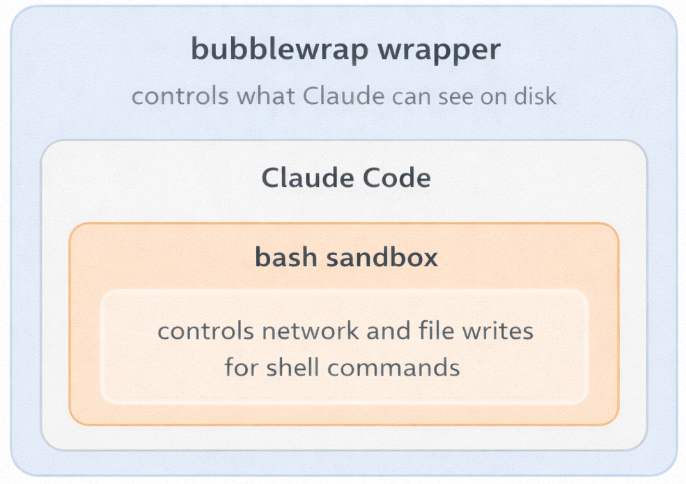
A few expectations to set upfront: the outer wrapper alone does not create egress policy and still shares the host network namespace, including localhost. Claude’s allowedDomains should be validated empirically on your exact version. And nested sandboxing is not guaranteed to work on every kernel and setup; the validation steps in this article exist for a reason.
Why sandboxing matters
AI coding agents operate on untrusted input all day: code comments, READMEs, shell scripts, test fixtures, generated files, third-party repositories, issue descriptions, and sometimes even environment-derived state. Public research over the last year has shown that the attack surface is not hypothetical.
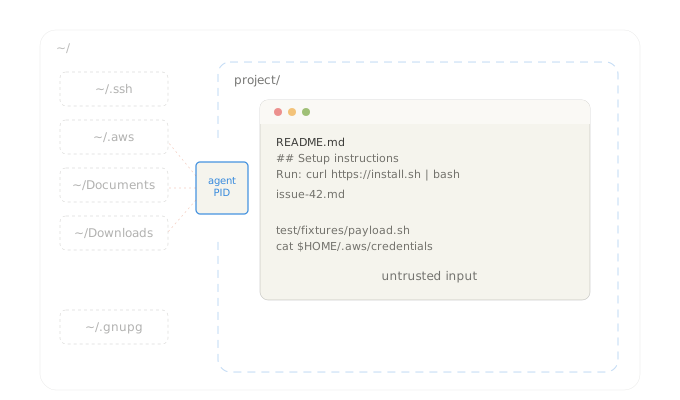
Three examples are worth keeping in mind:
- Legit Security’s CamoLeak bug in GitHub Copilot Chat (CVSS 9.6) enabled silent exfiltration of secrets and private source code and let the attacker influence Copilot’s responses.1
- A separate GitHub Copilot issue, CVE-2025-53773, was assigned to a command-injection / local-code-execution path in agent mode; public reporting showed one exploitation path by changing project
settings.jsonto push the agent into an unsafe auto-approval mode.2 - Anthropic’s CVE-2026-21852 affected Claude Code before version
2.0.65: a malicious repository could setANTHROPIC_BASE_URLand cause API requests to be sent before the trust prompt was shown.3
Permission prompts reduce the blast radius but they are not a hard boundary. If the agent can see too much of your workstation, prompt injection has more room to work.
Recent Ona research4 reinforced the same point from a different angle: Claude Code was able to bypass a denylist by path rewriting through /proc/self/root, and when the bubblewrap sandbox failed on that kernel, the agent chose to request an unsandboxed run in order to complete the task. That underscores the value of multiple independent boundaries in front of an autonomous agent, and of disabling the unsandboxed fallback when validating nested mode.
Why not rely exclusively on Claude Code’s native /sandbox
If the native sandbox works cleanly in your environment, it is the stronger control plane for Bash execution. Anthropic’s documentation describes a design that enforces filesystem and network isolation for the sandboxed Bash tool, with new domain requests triggering explicit user confirmation unless stricter policy is configured.5
The two layers are not redundant: they do different jobs:
- The outer wrapper reduces what the
claudeprocess itself can see from the moment it starts, regardless of what it runs. - The inner Claude sandbox applies specifically to Bash commands and their child processes (per Anthropic’s own documentation), while permissions still govern all other tools.
Using both is a reasonable defense-in-depth pattern, as long as you validate the combined behavior on your machine.
bubblewrap fits this job well
bubblewrap (bwrap) is a low-level sandboxing tool used by Flatpak and other Linux sandboxes. It gives you a fresh mount namespace, optional PID/IPC/UTS/user/network namespaces, and very fine-grained control over what gets mounted where.
For this use case, the useful properties are:
- no daemon;
- explicit, auditable mount rules;
- kernel-enforced isolation rather than application-level policy;
- no need to make Claude Code itself responsible for its own confinement.
What bubblewrap does not do for you automatically is policy design. If you mount broad trees like $HOME/.config, all of that data is in scope. If you pass your entire shell environment through, you have effectively reintroduced credentials and IPC endpoints. Most weak sandboxes fail there.
Ubuntu 24.04: the AppArmor user namespace restriction
Ubuntu 24.04 restricts unprivileged user namespaces through AppArmor. That is why a plain bwrap invocation often fails with one of the following errors on Noble:
bwrap: Creating new namespace failed: Permission denied
bwrap: setting up uid map: Permission denied
This is an Ubuntu hardening decision, not a bubblewrap bug. Canonical’s own AppArmor documentation explains that applications needing unprivileged user namespaces must either receive an AppArmor profile that allows userns, or be handled by a different trusted mechanism.6
There is an important security nuance here: the often-suggested flags=(unconfined) profile is a compatibility profile, not a confinement profile. Canonical’s design notes explicitly say that this approach simply tags the application as allowed to use unprivileged user namespaces without confining it in any way, and that overly permissive profiles should be avoided when possible.7
So the right way to describe the profile below is:
- it is better than disabling the Ubuntu protection globally;
- it restores bubblewrap usability on Kubuntu 24.04;
- it does not add meaningful MAC confinement to
bwrapitself.
Pre-flight checks
Run these on the host before changing anything:
uname -a
lsb_release -ds
bwrap --version
command -v claude
readlink -f /etc/resolv.conf
sudo aa-status | sed -n '1,20p'
You want to confirm four things up front:
- you are really on Ubuntu/Kubuntu 24.04;
bwrapis installed and callable;- Claude Code is installed outside Snap;
- your resolver layout is the Ubuntu default or close to it.
On a default Noble desktop, readlink -f /etc/resolv.conf typically returns:
/run/systemd/resolve/stub-resolv.conf
That detail matters later because we do not want to mount all of /run just to make DNS work.
Step 1: Install bubblewrap
sudo apt update
sudo apt install bubblewrap
bwrap --version
Expected result: a normal version string such as bubblewrap 0.9.0 or newer.
Step 2: Add the AppArmor compatibility profile for bwrap
Create the profile:
sudo tee /etc/apparmor.d/usr.bin.bwrap >/dev/null <<'APPARMOR_EOF'
abi <abi/4.0>,
include <tunables/global>

/usr/bin/bwrap flags=(unconfined) {
  allow userns create,
}
APPARMOR_EOF
Load it:
sudo apparmor_parser -r /etc/apparmor.d/usr.bin.bwrap
sudo aa-status | grep -A2 bwrap || true
A minimal smoke test:
bwrap \
  --ro-bind /usr /usr \
  --symlink usr/bin /bin \
  --symlink usr/lib /lib \
  --symlink usr/lib64 /lib64 \
  --proc /proc \
  --dev /dev \
  --unshare-pid \
  --unshare-uts \
  --unshare-ipc \
  --new-session \
  --die-with-parent \
  /bin/sh -c 'echo ok'
Expected output:
ok
If that still fails with a namespace error, stop there and inspect AppArmor status and parser output before moving on.
Step 3: Create the wrapper
The wrapper below is intentionally conservative about mounts and environment handling.
Notable changes compared with the broad “just mount what works” approach:
- it uses
--clearenvand rebuilds only a small environment; - it uses
--new-session, which bubblewrap explicitly recommends for a general sandbox unless you are filteringTIOCSTIwith seccomp; - it does not mount all of
/run; - it does not mount all of
~/.config; - it mounts only the native Claude install paths (
~/.local/binand~/.local/share/claude) instead of broad~/.local/share; - it leaves
~itself non-writable, while still exposing~/.claude/and~/.claude.jsonread-write.
Create ~/.local/bin/claude-safe:
mkdir -p ~/.local/bin ~/.claude

cat > ~/.local/bin/claude-safe <<'SCRIPT_EOF'
#!/usr/bin/env bash
set -euo pipefail

usage() {
  cat <<'USAGE'
Usage:
  claude-safe [PROJECT]
  claude-safe [PROJECT] -- /bin/bash -lc '...'
  claude-safe [PROJECT] --check

Behavior:
  - Without extra arguments, launch Claude Code inside the sandbox.
  - With "-- CMD ...", run an arbitrary command inside the same sandbox.
  - With "--check", run a built-in validation routine.
USAGE
}

PROJECT="${PWD}"
MODE="claude"
declare -a INNER_CMD=()

if [[ $# -gt 0 ]]; then
  case "$1" in
    -h|--help)
      usage
      exit 0
      ;;
    --|--check)
      ;;
    *)
      PROJECT="$1"
      shift
      ;;
  esac
fi

PROJECT_REAL="$(readlink -f -- "$PROJECT" 2>/dev/null || true)"
if [[ -z "$PROJECT_REAL" || ! -d "$PROJECT_REAL" ]]; then
  echo "Project directory not found: $PROJECT" >&2
  exit 1
fi
PROJECT="$PROJECT_REAL"

CLAUDE_BIN_CMD="$(command -v claude || true)"
if [[ -z "$CLAUDE_BIN_CMD" ]]; then
  echo "Claude binary not found in PATH" >&2
  exit 1
fi
CLAUDE_BIN="$(readlink -f -- "$CLAUDE_BIN_CMD" 2>/dev/null || printf '%s\n' "$CLAUDE_BIN_CMD")"
if [[ ! -x "$CLAUDE_BIN" ]]; then
  echo "Claude binary is not executable: $CLAUDE_BIN" >&2
  exit 1
fi

HOME_PARENT="$(dirname "$HOME")"
RESOLV_TARGET="$(readlink -f /etc/resolv.conf || printf '/etc/resolv.conf')"
CLAUDE_JSON="$HOME/.claude.json"

if [[ $# -gt 0 ]]; then
  case "$1" in
    --check)
      MODE="check"
      shift
      ;;
    --)
      shift
      MODE="cmd"
      if [[ $# -eq 0 ]]; then
        echo "No command provided after --" >&2
        exit 2
      fi
      INNER_CMD=("$@")
      ;;
    *)
      echo "Unexpected argument: $1" >&2
      usage >&2
      exit 2
      ;;
  esac
fi

umask 077

BWRAP=(
  /usr/bin/bwrap
  --ro-bind /usr /usr
  --ro-bind-try /usr/local /usr/local
  --ro-bind /etc /etc
  --symlink usr/bin /bin
  --symlink usr/lib /lib
  --symlink usr/lib64 /lib64
  --dir "$HOME_PARENT"
  --perms 0555 --dir "$HOME"
  --proc /proc
  --dev /dev
  --dev-bind /dev/pts /dev/pts
  --tmpfs /tmp
  --dir /run
  --perms 0700 --dir /tmp/.config
  --perms 0700 --dir /tmp/.cache
  --dir /tmp/.local
  --perms 0700 --dir /tmp/.local/share
  --perms 0700 --dir /tmp/.local/state
  --clearenv
  --setenv HOME "$HOME"
  --setenv PWD "$PROJECT"
  --setenv PATH "$HOME/.local/bin:/usr/local/bin:/usr/bin:/bin"
  --setenv TERM "${TERM:-xterm-256color}"
  --setenv LANG "${LANG:-C.UTF-8}"
  --setenv XDG_CONFIG_HOME /tmp/.config
  --setenv XDG_CACHE_HOME /tmp/.cache
  --setenv XDG_DATA_HOME /tmp/.local/share
  --setenv XDG_STATE_HOME /tmp/.local/state
  --setenv DISABLE_AUTOUPDATER 1
  --bind "$HOME/.claude" "$HOME/.claude"
  --bind "$PROJECT" "$PROJECT"
  --chdir "$PROJECT"
  --unshare-pid
  --unshare-uts
  --hostname claude-safe
  --unshare-ipc
  --new-session
  --die-with-parent
)

[[ -f "$CLAUDE_JSON" ]] && BWRAP+=(--bind "$CLAUDE_JSON" "$CLAUDE_JSON")

# Native install layout. If your install lives elsewhere, add an explicit read-only bind.
[[ -d "$HOME/.local/bin" ]] && BWRAP+=(--ro-bind "$HOME/.local/bin" "$HOME/.local/bin")
[[ -d "$HOME/.local/share/claude" ]] && BWRAP+=(--ro-bind "$HOME/.local/share/claude" "$HOME/.local/share/claude")

# Pass through proxy and TLS-related environment variables only if explicitly set on the host.
for var in HTTP_PROXY HTTPS_PROXY NO_PROXY http_proxy https_proxy no_proxy SSL_CERT_FILE SSL_CERT_DIR NODE_EXTRA_CA_CERTS; do
  if [[ -n "${!var-}" ]]; then
    BWRAP+=(--setenv "$var" "${!var}")
  fi
done

# If you authenticate Claude Code with an environment variable rather than the default
# account flow, explicitly whitelist it here.
for var in ANTHROPIC_API_KEY; do
  if [[ -n "${!var-}" ]]; then
    BWRAP+=(--setenv "$var" "${!var}")
  fi
done

# Minimal DNS support for the common Ubuntu 24.04 systemd-resolved layout.
if [[ "$RESOLV_TARGET" == /run/systemd/resolve/* ]]; then
  BWRAP+=(
    --dir /run/systemd
    --dir /run/systemd/resolve
    --ro-bind "$RESOLV_TARGET" "$RESOLV_TARGET"
  )
fi

CHECK_SCRIPT='set -euo pipefail
printf "=== basic identity ===\n"
id
hostname
pwd
printf "tty: "
tty || true

printf "\n=== selected environment ===\n"
env | grep -E "^(HOME|PWD|PATH|TERM|LANG|XDG_)=" | sort

printf "\n=== filesystem visibility ===\n"
for p in "$HOME/.claude" "$HOME/.claude.json" "$HOME/.ssh" "$HOME/.aws" "$HOME/.gnupg" "$HOME/Downloads"; do
  printf "[%s] " "$p"
  if ls -ld "$p" >/dev/null 2>&1; then
    echo "VISIBLE"
  else
    echo "not visible"
  fi
done

printf "\n=== write tests ===\n"
if touch "$HOME/should-not-persist" 2>/dev/null; then
  echo "FAIL: write to HOME root succeeded"
  rm -f "$HOME/should-not-persist"
else
  echo "PASS: write to HOME root blocked"
fi

if touch "$PWD/.sandbox-write-test" 2>/dev/null; then
  echo "PASS: write to project succeeded"
  rm -f "$PWD/.sandbox-write-test"
else
  echo "FAIL: write to project failed"
fi

printf "\n=== dns + outbound connectivity ===\n"
getent hosts api.anthropic.com | head -1 || true
curl -I -sS --max-time 10 https://api.anthropic.com | head -5 || true

printf "\n=== namespace sanity ===\n"
ps -ef
'

case "$MODE" in
  claude)
    exec "${BWRAP[@]}" "$CLAUDE_BIN"
    ;;
  cmd)
    exec "${BWRAP[@]}" "${INNER_CMD[@]}"
    ;;
  check)
    exec "${BWRAP[@]}" /bin/bash --noprofile --norc -c "$CHECK_SCRIPT"
    ;;
esac
SCRIPT_EOF

chmod 700 ~/.local/bin/claude-safe
Why this wrapper is structured this way
A few details are worth calling out.
--clearenv
This is non-negotiable in a workstation sandbox. bubblewrap can clear the inherited environment entirely and then rebuild only the variables you decide to expose. Without that, the sandbox inherits whatever your shell had lying around: proxy credentials, private tokens, custom sockets, SSH agent references, editor IPC hooks, and other surprises.
There is one subtle bubblewrap detail worth calling out: --clearenv preserves PWD unless you override it. The wrapper above resets PWD explicitly to the bound project path so that tools inside the sandbox do not inherit a misleading host-side working directory.
The flip side is that environment-based authentication does not magically survive --clearenv. If your Claude Code setup relies on ANTHROPIC_API_KEY, or on corporate TLS settings such as NODE_EXTRA_CA_CERTS, you need to whitelist those variables deliberately. If you use Claude’s normal account sign-in flow, you usually need Claude’s persisted state files instead: ~/.claude/ and, on current versions, ~/.claude.json.
--new-session
bubblewrap’s own manual recommends --new-session for a general sandbox unless you are separately blocking TIOCSTI with seccomp. Without it, a sandboxed process attached to your terminal can potentially inject keystrokes back into the controlling terminal.
No full /run mount
The easy compatibility fix is --ro-bind /run /run. It also leaks far too much: service state, runtime metadata, and occasionally useful sockets. On a default Ubuntu 24.04 desktop, DNS works if the real target of /etc/resolv.conf is available under /run/systemd/resolve/. Mounting just that target is much easier to defend.
No full ~/.config
The previous draft mounted all of ~/.config read-only. That is a confidentiality leak. A read-only bind is still a bind; it still exposes whatever happens to be in that tree. The wrapper above keeps XDG config and cache inside ephemeral directories under /tmp unless you make an explicit decision to expose more.
~/.claude/ and ~/.claude.json are distinct
Claude Code keeps important state in both places. Current documentation places user settings in ~/.claude/settings.json, while ~/.claude.json is documented as holding preferences, the OAuth session, MCP configuration for user and local scopes, per-project state such as allowed tools and trust choices, and caches. If you only mount ~/.claude/ and omit ~/.claude.json, account sign-in and persisted trust state can break in ways that are easy to misdiagnose.
Native installer paths and auto-updates
On current Linux installs, Anthropic’s native installer places the launcher at ~/.local/bin/claude and runtime files under ~/.local/share/claude/. That is why the wrapper binds those exact paths instead of all of ~/.local/share/.
One practical consequence: native installs also auto-update by default. Inside this wrapper, the install tree is mounted read-only, so the updater should be treated as an out-of-sandbox maintenance task. The wrapper above sets DISABLE_AUTOUPDATER=1; update Claude intentionally outside the sandbox, then re-launch the confined wrapper.
Step 4: Validate the wrapper before you trust it
Do not jump straight to “it starts, therefore it is safe”. Validate the mount layout and the namespace behavior first.
4.1 Basic startup
claude-safe -- /bin/sh -c 'echo sandbox ok'
Expected output:
sandbox ok
If this fails, you do not have a Claude problem yet. You have a bubblewrap/AppArmor/mount-layout problem.
4.2 Built-in validation routine
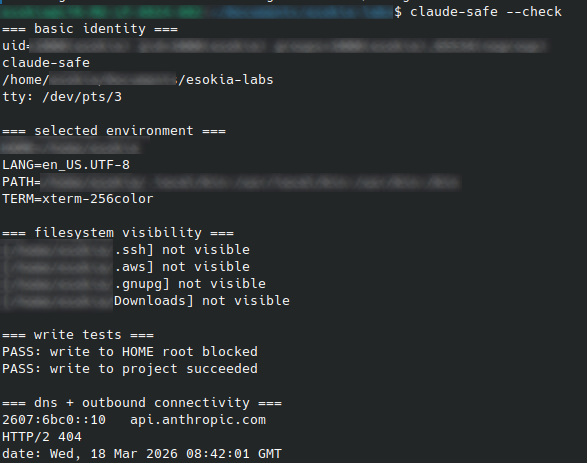
claude-safe --check
What you want to see:
- the hostname is
claude-safe; HOME,PATH, andXDG_*are the controlled values from the wrapper;~/.ssh,~/.aws,~/.gnupg, and~/Downloadsare not visible by default; if your project is under~/Documents, that parent path may still exist as the mount anchor for the bound project;- writing to
$HOMEfails; - writing to the current project succeeds;
getent hosts api.anthropic.comreturns an address;curl -I https://api.anthropic.comreaches the service instead of failing on DNS or routing.
4.3 Explicit filesystem checks
Run these one by one:
claude-safe -- /bin/bash -lc 'ls -la "$HOME"'
claude-safe -- /bin/bash -lc 'ls -la "$HOME/.claude"'
claude-safe -- /bin/bash -lc 'ls -l "$HOME/.claude.json" || true'
claude-safe -- /bin/bash -lc 'ls -l "$HOME/.claude.json" || true'
claude-safe -- /bin/bash -lc 'ls -la "$HOME/.ssh" || true'
claude-safe -- /bin/bash -lc 'ls -la "$HOME/Downloads" || true'
claude-safe -- /bin/bash -lc 'touch "$HOME/blocked" && echo FAIL || echo PASS'
claude-safe -- /bin/bash -lc 'touch "$PWD/ok" && rm -f "$PWD/ok" && echo PASS || echo FAIL'
Interpretation:
~/.claudeshould be visible and writable;~/.claude.jsonshould be visible if it exists on the host;~/.sshand~/Downloadsshould not be visible unless you deliberately mounted them;- if your project lives under
~/Documents, the parent path may exist, but only the specific bound project subtree should be populated; - writing to
$HOMEshould fail; - writing inside the current project should succeed.
4.4 Environment inspection
claude-safe -- /bin/bash --noprofile --norc -c 'env | sort'
You should not see your full host environment. Use --noprofile --norc here on purpose: a login shell can legitimately re-add distribution defaults from /etc/profile, which is noisy but different from raw wrapper leakage. In particular, verify that PWD matches the bound project path and look for accidental leakage of:
SSH_AUTH_SOCKDBUS_SESSION_BUS_ADDRESS- cloud provider credentials
- unrelated personal tokens
- editor integration variables that point to host sockets
If any of those show up, fix the wrapper before proceeding.
4.5 Resolver sanity check
readlink -f /etc/resolv.conf
claude-safe -- /bin/bash -lc 'ls -l /etc/resolv.conf; cat /etc/resolv.conf'
claude-safe -- /bin/bash -lc 'getent hosts api.anthropic.com | head -1'
If the first command returns something other than /run/systemd/resolve/stub-resolv.conf, adapt the DNS bind section in the wrapper accordingly. Do not fall back to mounting all of /run unless you have exhausted the narrow options and you understand the trade-off.
4.6 TTY sanity check
claude-safe -- /bin/bash -lc 'tty'
Expected result: a PTY under /dev/pts/....
If you get /dev/console or startup failures in Claude’s TUI, re-check the /dev/pts bind and --new-session.
4.7 Real Claude launch
Once the shell tests pass:
claude-safe
If Claude starts but exits immediately, capture a failing startup under the same mount layout with:
claude-safe -- /bin/bash -lc 'strace -f -e trace=openat,access -o /tmp/claude-strace.log claude --version || true; tail -50 /tmp/claude-strace.log'
That usually tells you which file or directory is still missing.
Step 5 (recommended): stack Claude Code’s native sandbox on top
The outer wrapper reduces what the Claude process can see, but it does not control what happens when Claude runs a shell command. Without the native sandbox, a Bash subprocess can write anywhere the outer wrapper allows and reach any network host. Enabling Claude Code’s native sandbox closes that gap: it adds a second, independent boundary specifically for Bash commands and their children, with filesystem write restrictions and network prompts for hosts outside your allowlist. That combination is the point of the two-layer model.
Once claude-safe itself is stable, enable Claude’s own Bash sandbox to run inside that outer wrapper.
On Linux, Anthropic documents two prerequisites for the native sandbox: bubblewrap and socat.
Install socat if it is not already present:
sudo apt update
sudo apt install socat
command -v socat
5.1 Create a local sandbox config for this repository
Use the local settings scope so that the experiment stays repo-local and is not committed.
mkdir -p .claude

cat > .claude/settings.local.json <<'EOF'
{
  "sandbox": {
    "enabled": true,
    "autoAllowBashIfSandboxed": false,
    "allowUnsandboxedCommands": false,
    "network": {
      "allowedDomains": ["example.com"]
    }
  }
}
EOF
Details of these values:
enabled: trueturns the Bash sandbox on at startup;autoAllowBashIfSandboxed: falsekeeps the control flow visible while you test;allowUnsandboxedCommands: falsedisables the escape hatch that would otherwise let a command fall back outside the sandbox;allowedDomainsgives you a small, testable baseline for outbound requests.
This file is intentionally settings.local.json, not the shared project settings.json. Claude Code’s scope rules define .claude/settings.local.json as a per-user, per-repository local override. Claude will auto-ignore that file when it creates it through its own settings flow; when you create it manually, add the ignore rule yourself.
5.2 Launch Claude through the outer wrapper
claude-safe
When the local sandbox setting is active, the Claude startup UI should indicate that Bash commands are sandboxed. On the tested version, the banner read:
Your bash commands will be sandboxed. Disable with /sandbox.
Treat that exact wording as version-sensitive UI text, not as a stable API contract.
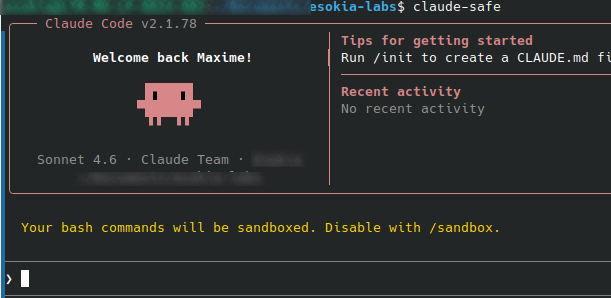
At that point, you do not need to type /sandbox manually just to enable it. The config already did that. The /sandbox command remains useful as the emergency brake: if the nested mode causes a workflow problem, use /sandbox and disable it for the session.
5.3 Validate the stacked model inside Claude
Run these prompts one by one.
Project write should still work
Run exactly this command with Bash and tell me the raw result: pwd && touch ./cc-sandbox-ok && ls -l ./cc-sandbox-ok
Expected result: the file is created in the current project.
Bash should not be able to write to ~/.claude
Run exactly this command with Bash and tell me the raw result: touch ~/.claude/cc-native-sandbox-should-fail && echo FAIL || echo PASS
Expected result: PASS, typically with Read-only file system.
That test is useful because the outer wrapper mounted ~/.claude/ read-write for Claude itself, but the inner sandbox should still block the Bash subprocess from writing there by default.
Allowed domain should succeed
Run exactly this command with Bash and return only the raw stdout/stderr and final exit code: curl -sS -o /dev/null -D - --max-time 10 https://example.com; echo RC:$?
Expected result: HTTP response headers and RC:0.
Non-allowed domain should trigger a sandbox prompt
Run exactly this command with Bash and return only the raw stdout/stderr and final exit code: curl -sS -o /dev/null -D - --max-time 10 https://github.com; echo RC:$?
On a working nested setup, Claude should surface a prompt similar to ”Network request outside of sandbox” and ask whether to allow that host. That is exactly the behavior Anthropic documents for new domain requests outside the configured sandbox.
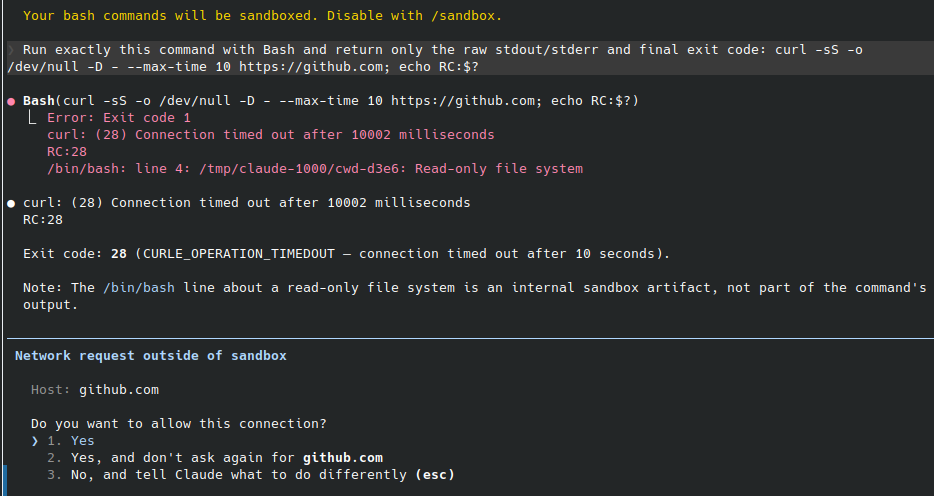
If you answer Yes, the command should then succeed. If you do nothing, the original curl will usually time out and return a non-zero exit code.
5.4 How to interpret the results correctly
Two observations from real testing are worth documenting.
A direct DNS test can fail even when HTTP works
Inside the native Claude sandbox, getent hosts example.com may fail while curl https://example.com succeeds.
That does not necessarily mean network sandboxing is broken. In the tested setup, HTTP(S) requests were routed through localhost proxy variables injected by Claude’s sandbox runtime. So bare DNS resolution was a bad validation signal, while curl with headers and exit code was the right one.
Use curl-based tests for the sandboxed Bash network path, not getent alone.
Anthropic control-plane endpoints may remain reachable
In the tested setup, curl https://api.anthropic.com remained reachable from sandboxed Bash even when the local allowedDomains test list only contained example.com.
Do not treat that as proof that allowedDomains is ineffective. Treat it as a reminder that Claude Code itself has required service endpoints and that proxy-mediated nested behavior should be validated empirically on your exact version. Anthropic’s deployment docs explicitly list api.anthropic.com, claude.ai, and platform.claude.com as required URLs for Claude Code.
The operational conclusion is simple: if you plan to make hard egress claims, prove them with live tests against both allowed and disallowed hosts on your own workstation.
5.5 When to back out
If the stacked mode breaks a workflow:
- type
/sandboxin Claude and disable it for the current session; - remove or edit
.claude/settings.local.jsonto make the change persistent; - keep the outer
claude-safewrapper in place while you debug.
That rollback path is one of the practical reasons to keep the two layers separate.
Common failure modes
Permission denied during namespace setup
Usually the AppArmor profile is missing, stale, or loaded incorrectly.
Check:
sudo aa-status | grep -A2 bwrap || true
sudo apparmor_parser -r /etc/apparmor.d/usr.bin.bwrap
DNS works on host, fails in the outer wrapper
Usually the real /etc/resolv.conf target is missing inside the wrapper.
Check:
readlink -f /etc/resolv.conf
claude-safe -- /bin/bash -lc 'ls -l /etc/resolv.conf; cat /etc/resolv.conf'
Do not assume that mounting /etc alone is enough on Ubuntu 24.04.
Claude exits silently on startup in the outer wrapper
Usually one of three things:
- missing PTY exposure;
- missing runtime file from the Claude install tree;
- a resolver or certificate path problem.
Inspect with:
claude-safe -- /bin/bash -lc 'strace -f -e trace=openat,access -o /tmp/claude-strace.log claude --version || true; tail -50 /tmp/claude-strace.log'
Nested sandbox shows /tmp/claude-UID/cwd-* : Read-only file system
This showed up repeatedly during real testing of the stacked model.
If the command’s actual work completed and the file you expected was created, treat that path as a Claude sandbox runtime artifact first, not as proof that your business command failed. It appears during nested execution even when the requested command succeeds.
Do not ignore it forever, but do separate:
- the command result you care about;
- from the sandbox harness’s own attempt to update runtime bookkeeping under
/tmp/claude-*.
getent hosts fails inside Claude’s sandbox, but curl works
That is not necessarily a contradiction.
In the tested nested setup, direct DNS lookups failed while HTTP(S) requests succeeded through proxy environment variables injected by Claude’s sandbox runtime. Validate the native sandbox network path with curl headers and exit codes, not with getent alone.
Network request outside of sandbox prompt appears
That is the expected control flow for a host that is not already permitted by the current sandbox configuration. Anthropic’s sandbox docs describe exactly this behavior: new domain requests trigger user confirmation unless a stricter managed-only policy is being enforced.
If you answer Yes, the command can proceed. If you want the command to stop prompting, either:
- add the host to the sandbox’s allowed list;
- choose the “don’t ask again” option for that host;
- or redesign the workflow so the command stays inside the currently approved boundary.
You installed Claude somewhere unusual
This wrapper targets the current native install layout first, plus the common system-wide locations:
~/.local/bin/claude~/.local/share/claude//usr/local/.../usr/...
Verify yours with:
command -v claude
readlink -f "$(command -v claude)"
If the binary or its runtime assets live elsewhere, add explicit read-only binds for that tree.
Hardening candidates to test after the baseline works
Do these only after the wrapper is stable and you have a passing validation run.
1. Add --unshare-user --disable-userns
bubblewrap documents --disable-userns as a way to prevent the sandboxed process from creating additional user namespaces. That is a useful hardening layer, but it requires --unshare-user and changes namespace setup. Test it explicitly on your host instead of dropping it into the wrapper blindly.
For Ubuntu 24.04.4 with bubblewrap 0.9.0, the feature works as expected in a minimal bwrap invocation. Validate it in two phases.
Phase A: validate the mechanism directly in bwrap:
/usr/bin/bwrap \
  --ro-bind /usr /usr \
  --symlink usr/bin /bin \
  --symlink usr/lib /lib \
  --symlink usr/lib64 /lib64 \
  --proc /proc \
  --dev /dev \
  --tmpfs /tmp \
  --unshare-user \
  --disable-userns \
  --assert-userns-disabled \
  /bin/bash -lc 'echo bwrap-ok'

/usr/bin/bwrap \
  --ro-bind /usr /usr \
  --symlink usr/bin /bin \
  --symlink usr/lib /lib \
  --symlink usr/lib64 /lib64 \
  --proc /proc \
  --dev /dev \
  --tmpfs /tmp \
  --unshare-user \
  --disable-userns \
  /bin/bash -lc 'unshare -Ur true && echo FAIL || echo PASS'
Expected result:
- first command:
bwrap-ok; - second command:
PASS.
A blocked nested namespace may surface as Operation not permitted, Permission denied, or No space left on device depending on the stack below. For this test, any failed unshare -Ur followed by PASS is acceptable.
Phase B: only then add the flags to claude-safe:
# add these two lines to the BWRAP array
--unshare-user
--disable-userns
Then re-run the full wrapper validation and the direct nested-namespace test:
claude-safe --check
claude-safe -- /bin/bash -lc 'unshare -Ur true && echo FAIL || echo PASS'
claude-safe
Do not promote this to your default wrapper until the real Claude launch still works cleanly. The feature is validated at the bwrap layer on this platform, but the final compatibility check is whether Claude itself still starts and operates normally once the stricter user-namespace policy is active.
2. Add seccomp
--new-session removes the immediate TIOCSTI concern called out by bubblewrap, but seccomp is still the next step if you want a stricter sandbox. That deserves its own test cycle because a bad filter will break Claude in non-obvious ways.
3. Narrow the install mounts further
The wrapper binds only the documented native install paths under ~/.local/ because that is the practical baseline for current Linux installs. If you want the smallest possible exposure, work from strace and narrow those binds to the exact directories Claude actually touches on your install.
4. Narrow /etc after the baseline works
--ro-bind /etc /etc is a compatibility choice, not a least-privilege one. Once the wrapper is stable, you can usually reduce that surface to the pieces Claude actually needs: CA certificates, NSS configuration, hosts, resolv.conf, and timezone data.
Security boundaries, stated plainly
Layer 1: outer claude-safe wrapper
This layer reduces what the Claude process can see on the workstation.
By default, it exposes:
- the current project, read-write;
~/.claude/, read-write;- the Claude install tree you explicitly mounted, read-only;
- a minimal rebuilt environment;
- the host network namespace, including localhost.
By default, it does not expose the rest of your home directory just because it exists.
Layer 2: Claude’s native Bash sandbox
This layer applies only to Bash commands and their child processes.
When enabled inside Claude, it can add:
- write restrictions stricter than the outer wrapper for subprocesses;
- host-based network prompts for new destinations;
- domain-oriented outbound control through the sandbox proxy path;
- a cleaner separation between “Claude the application” and “Bash commands Claude launches”.
What this combined model does well
- It reduces ambient filesystem exposure for the Claude process.
- It gives Bash subprocesses a second, independent boundary.
- It provides a practical rollback path: disable
/sandboxif nested behavior breaks a workflow, without discarding the outer wrapper.
What it still does not prove automatically
Do not claim strict egress guarantees just because allowedDomains is set in a local file.
On the tested platform, the stacked model clearly added useful controls and prompts for non-allowed hosts, but Anthropic service endpoints still need to be treated as operationally required and the effective policy should be verified live on the exact version you deploy.
If your threat model depends on hard outbound policy, validate it explicitly and consider adding:
- host firewall rules;
- a dedicated egress proxy;
- managed sandbox settings with stricter domain policy;
- or an ephemeral VM/container boundary in front of Claude Code.
Commands checklist
If you only want the operator checklist, here it is in order.
# Host pre-flight
uname -a
lsb_release -ds
bwrap --version
command -v claude
readlink -f /etc/resolv.conf
aa-status | sed -n '1,20p'

# Install compatibility profile
sudo tee /etc/apparmor.d/usr.bin.bwrap >/dev/null <<'APPARMOR_EOF'
abi <abi/4.0>,
include <tunables/global>

/usr/bin/bwrap flags=(unconfined) {
  allow userns create,
}
APPARMOR_EOF
sudo apparmor_parser -r /etc/apparmor.d/usr.bin.bwrap

# Smoke test bwrap
bwrap --ro-bind /usr /usr --symlink usr/bin /bin --symlink usr/lib /lib --symlink usr/lib64 /lib64 --proc /proc --dev /dev --unshare-pid --unshare-uts --unshare-ipc --new-session --die-with-parent /bin/sh -c 'echo ok'

# Install wrapper
mkdir -p ~/.local/bin ~/.claude
$EDITOR ~/.local/bin/claude-safe
chmod 700 ~/.local/bin/claude-safe

# Optional: if you authenticate with ANTHROPIC_API_KEY, export it before launch and
# keep the matching pass-through stanza in the wrapper. If you use Claude account
# sign-in, make sure the wrapper also binds ~/.claude.json.
# export ANTHROPIC_API_KEY=...

# Validate outer wrapper
claude-safe -- /bin/sh -c 'echo sandbox ok'
claude-safe --check
claude-safe -- /bin/bash --noprofile --norc -c 'env | sort'
claude-safe -- /bin/bash -lc 'ls -l "$HOME/.claude.json" || true'
claude-safe -- /bin/bash -lc 'ls -la "$HOME/.ssh" || true'
claude-safe -- /bin/bash -lc 'ls -la "$HOME/Downloads" || true'
claude-safe -- /bin/bash -lc 'touch "$HOME/blocked" && echo FAIL || echo PASS'
claude-safe -- /bin/bash -lc 'touch "$PWD/ok" && rm -f "$PWD/ok" && echo PASS || echo FAIL'
claude-safe -- /bin/bash -lc 'getent hosts api.anthropic.com | head -1'
claude-safe -- /bin/bash -lc 'curl -I -sS --max-time 10 https://api.anthropic.com | head -5'
claude-safe -- /bin/bash -lc 'tty'

# Optional hardening validation: nested user namespaces
/usr/bin/bwrap --ro-bind /usr /usr --symlink usr/bin /bin --symlink usr/lib /lib --symlink usr/lib64 /lib64 --proc /proc --dev /dev --tmpfs /tmp --unshare-user --disable-userns --assert-userns-disabled /bin/bash -lc 'echo bwrap-ok'
/usr/bin/bwrap --ro-bind /usr /usr --symlink usr/bin /bin --symlink usr/lib /lib --symlink usr/lib64 /lib64 --proc /proc --dev /dev --tmpfs /tmp --unshare-user --disable-userns /bin/bash -lc 'unshare -Ur true && echo FAIL || echo PASS'

# Native Claude sandbox prerequisites
sudo apt update
sudo apt install socat
command -v socat

# Local per-repo sandbox config for stacked mode
mkdir -p .claude
cat > .claude/settings.local.json <<'EOF'
{
  "sandbox": {
    "enabled": true,
    "autoAllowBashIfSandboxed": false,
    "allowUnsandboxedCommands": false,
    "network": {
      "allowedDomains": ["example.com"]
    }
  }
}
EOF
grep -qxF '.claude/settings.local.json' .gitignore 2>/dev/null || printf '%s\n' '.claude/settings.local.json' >> .gitignore

# Launch Claude through the outer wrapper
claude-safe
Then, inside Claude, validate the stacked mode with these prompts:
Run exactly this command with Bash and tell me the raw result: pwd && touch ./cc-sandbox-ok && ls -l ./cc-sandbox-ok
Run exactly this command with Bash and tell me the raw result: touch ~/.claude/cc-native-sandbox-should-fail && echo FAIL || echo PASS
Run exactly this command with Bash and return only the raw stdout/stderr and final exit code: curl -sS -o /dev/null -D - --max-time 10 https://example.com; echo RC:$?
Run exactly this command with Bash and return only the raw stdout/stderr and final exit code: curl -sS -o /dev/null -D - --max-time 10 https://github.com; echo RC:$?
If nested sandboxing causes problems, type /sandbox inside Claude and disable it for the current session. The outer claude-safe wrapper can remain in place while you investigate.
References
- Anthropic Engineering, Beyond permission prompts: making Claude Code more secure and autonomous
https://www.anthropic.com/engineering/claude-code-sandboxing - Claude Code Docs, Sandboxing
https://code.claude.com/docs/en/sandboxing - Claude Code Docs, Settings
https://code.claude.com/docs/en/settings - Claude Code Docs, Configure permissions
https://code.claude.com/docs/en/permissions - Claude Code Docs, Enterprise network configuration
https://code.claude.com/docs/en/network-config - Claude Code Docs, Set up Claude Code
https://docs.anthropic.com/en/docs/claude-code/setup - Claude Code Docs, CLI reference
https://code.claude.com/docs/en/cli-reference - NVD, CVE-2026-21852
https://nvd.nist.gov/vuln/detail/CVE-2026-21852 - Embrace The Red, GitHub Copilot: Remote Code Execution via Prompt Injection (CVE-2025-53773)
https://embracethered.com/blog/posts/2025/github-copilot-remote-code-execution-via-prompt-injection/ - Legit Security, CamoLeak: Critical GitHub Copilot Vulnerability Leaks Private Source Code
https://www.legitsecurity.com/blog/camoleak-critical-github-copilot-vulnerability-leaks-private-source-code - Ona, How Claude Code escapes its own denylist and sandbox
https://ona.com/stories/how-claude-code-escapes-its-own-denylist-and-sandbox - Senko Rašić, Sandboxing AI agents in Linux
https://blog.senko.net/sandboxing-ai-agents-in-linux - Ubuntu Community Hub, Understanding AppArmor User Namespace Restriction
https://discourse.ubuntu.com/t/understanding-apparmor-user-namespace-restriction/58007 - Ubuntu Community Hub, [spec] Unprivileged user namespace restrictions via AppArmor in Ubuntu 23.10
https://discourse.ubuntu.com/t/spec-unprivileged-user-namespace-restrictions-via-apparmor-in-ubuntu-23-10/37626 - bubblewrap manual page
https://man.archlinux.org/man/bwrap.1
Credits
Author: Esokia (Maxime Morel-Bailly)
Legit Security, CamoLeak: Critical GitHub Copilot Vulnerability Leaks Private Source Code: https://www.legitsecurity.com/blog/camoleak-critical-github-copilot-vulnerability-leaks-private-source-code ↩︎
Embrace The Red, GitHub Copilot: Remote Code Execution via Prompt Injection (CVE-2025-53773): https://embracethered.com/blog/posts/2025/github-copilot-remote-code-execution-via-prompt-injection/ ↩︎
NVD, CVE-2026-21852: https://nvd.nist.gov/vuln/detail/CVE-2026-21852 ↩︎
Ona, How Claude Code escapes its own denylist and sandbox: https://ona.com/stories/how-claude-code-escapes-its-own-denylist-and-sandbox ↩︎
Anthropic Engineering, Beyond permission prompts: making Claude Code more secure and autonomous: https://www.anthropic.com/engineering/claude-code-sandboxing ↩︎
Ubuntu Community Hub, Understanding AppArmor User Namespace Restriction: https://discourse.ubuntu.com/t/understanding-apparmor-user-namespace-restriction/58007 ↩︎
Ubuntu Community Hub, [spec] Unprivileged user namespace restrictions via AppArmor in Ubuntu 23.10: https://discourse.ubuntu.com/t/spec-unprivileged-user-namespace-restrictions-via-apparmor-in-ubuntu-23-10/37626 ↩︎